The best backend for vibe coders in 2026 depends on where you are as a builder. This guide breaks down the five strongest options - PocketBase, Firebase, Xano, Supabase, and Butterbase - explaining exactly what each one does, who it is built for, and when you should choose it. We saved the best for last.
Why choosing the right backend matters more in 2026 than ever before
The vibe coding movement changed everything about how software gets built. Tools like Claude Code, Cursor, Lovable, and Framer have made it possible for non-technical founders, designers, product managers, and weekend builders to create fully functional frontends in hours instead of months.
But the backend - the database, authentication, APIs, file storage, and server logic that make an app actually work - has not kept up. Most backend platforms were designed for developers who know SQL, understand REST architecture, and are comfortable reading error logs in a terminal.
The result is a gap. Millions of vibe coders can build beautiful frontends. Fewer know what to do next.
In 2026, that gap is starting to close. A new generation of backend platforms is being built specifically for the way AI coding tools work - through natural language, via MCP (Model Context Protocol), with automatic provisioning and no configuration required. At the same time, developer-first platforms like Supabase have grown explosively as the default backend for the AI-native app ecosystem.
Choosing the right backend determines whether your project stays a prototype or becomes a real product. This guide tells you exactly how to choose.
What is MCP and why does it matter for vibe coders?
MCP is an open standard developed by Anthropic that lets AI coding tools communicate with external services. In practical terms, it means that when you describe what you want to build inside Claude Code or another MCP-compatible tool, the AI can automatically provision a backend - creating database tables, setting up authentication, generating APIs - without you writing any backend code.
For vibe coders, MCP changes the game. Instead of switching between your AI coding tool and a separate backend dashboard, everything happens inside the conversation. You describe the app. The backend appears.
Not all backend platforms support MCP yet. The ones that do offer a fundamentally different experience for non-technical builders. Keep this in mind as you read the comparisons below.
1. PocketBase - Best for self-hosters and side projects
What it is
PocketBase is a single open-source Go binary - one file - that contains a complete backend: SQLite database, authentication, file storage, real-time subscriptions, and an admin dashboard. It reached 56,000 GitHub stars with zero marketing budget when its creator posted it on Hacker News in July 2022, proving that a genuinely remarkable product will be shared by developers without being asked.
How it works
You download one file. You run it. You have a complete backend. The admin dashboard is included. The JavaScript and Dart SDKs are included. The REST API documentation is auto-generated. There is no cloud account to create, no credit card to enter, no configuration to manage. It runs on your laptop, on a $5 VPS, on a Raspberry Pi, or embedded inside a desktop app.
PocketBase uses SQLite as its database, which is more powerful than most people realise. SQLite is the most widely deployed database in the world, used by Apple, Google, Mozilla, and countless production systems. It is not a toy - it is a remarkably capable database for applications that do not require horizontal scaling.
The developer experience
The PocketBase community is passionate in a way that most software communities are not, because the product genuinely surprised them. The documentation is considered among the best in any open-source project. The creator responds personally to GitHub issues. The single-binary architecture means deployments are as simple as copying one file to a server.
Who it is for
Developers who want full control and zero infrastructure cost. Side project builders who want to ship fast without a cloud account. Teams with compliance requirements that mean data must stay on their own servers. Anyone who values simplicity over scalability.
What you give up
PocketBase is self-hosted, meaning you manage your own infrastructure. It does not scale horizontally - it runs on a single server, which is sufficient for most side projects and small products but becomes a limitation at high traffic. There is no managed cloud option, no support team to call when something breaks, and no MCP integration for AI coding tools.
The bottom line
PocketBase is the best backend for side projects, MVPs, and any builder who values ownership and simplicity over managed infrastructure. If you want zero cost, total control, and do not need to scale beyond a single server, PocketBase is hard to beat.
2. Firebase - Best for mobile apps and the Google ecosystem
What it is
Firebase is Google's Backend-as-a-Service platform, launched in 2011 and acquired by Google in 2014. It remains one of the most widely used backends in the world - particularly for mobile applications - with a development ecosystem spanning Android, iOS, and web. It is the most mature platform on this list, with over a decade of production use at massive scale.
How it works
Firebase offers two database options: the original Realtime Database (a NoSQL JSON tree that syncs in real time across all connected clients) and Cloud Firestore (a more structured NoSQL database with better querying and offline support). Both are NoSQL, meaning data is stored as documents rather than relational tables.
Beyond the database, Firebase includes authentication (with support for email, phone, Google, Apple, Facebook, and more), cloud storage, cloud functions, hosting, crash reporting, analytics, A/B testing, and push notifications. It is the most comprehensive single platform in this list.
The developer experience
Firebase's greatest strength is also its most important constraint: it is deeply integrated with Google's ecosystem. If you are building an Android app, a Google Cloud-based service, or anything that benefits from Gemini AI integration, Firebase is the natural choice. The mobile SDKs are the best in the industry. The analytics and crash reporting tools are mature and powerful.
The challenge is the NoSQL data model. Firebase's databases store data as flexible documents rather than structured tables with relationships. This is fast and simple for certain use cases - chat apps, activity feeds, real-time collaboration - but becomes complicated when your data has complex relationships between entities.
Who it is for
Mobile developers building iOS and Android apps. Teams already in the Google Cloud ecosystem. Builders who need strong real-time sync and offline support. Anyone who benefits from Firebase's deep Google integrations, including Gemini AI and Google Analytics.
What you give up
The NoSQL data model becomes a limitation for apps with complex relational data. Pricing at scale is less predictable than competitors. There is no self-hosting option - you are tied to Google's infrastructure. There is no MCP integration for AI-native workflows.
The bottom line
Firebase is the best choice for mobile-first applications and teams already invested in the Google ecosystem. Its real-time sync, offline support, and mobile SDKs remain unmatched. For web-first vibe coding projects, other options on this list will serve you better.
3. Xano - Best for no-code builders in the visual tool ecosystem
What it is
Xano is the leading no-code backend platform, with over 40,000 developers and founders using it to power applications built with Bubble, WeWeb, FlutterFlow, and other visual frontend tools. It is a visual interface for building APIs, database schemas, and business logic - without writing code.
How it works
Xano replaces what would otherwise be a backend developer with a visual logic builder. You create database tables through a point-and-click interface, define API endpoints by dragging and dropping functions together, and build complex business logic - conditional branching, loops, external API calls, data transformations - visually.
The database is PostgreSQL under the hood, giving you relational power without requiring SQL. Xano's "Function Stack" is the heart of the platform: a visual builder where you define exactly what happens when an API endpoint is called. It is more powerful than it sounds - teams have built complex multi-step workflows, payment integrations, and AI-powered pipelines entirely within Xano's visual system.
The developer experience
Xano's founder Prakash Chandran described their content strategy as building a "honeypot of value" - YouTube tutorials showing exactly how to use Xano to build specific things. This investment in education means there is an enormous library of guides, tutorials, and templates for the most common use cases. If you get stuck, someone has almost certainly documented the solution.
The platform's tight integrations with Bubble and WeWeb are particularly strong. If your frontend is in either of those tools, Xano is often the most natural backend choice - the communities overlap, the documentation connects, and the workflows are designed to work together.
Who it is for
No-code founders building with visual frontend tools. Teams that want backend power without writing code and are willing to invest time in learning Xano's visual system. Agencies building client apps in the no-code ecosystem.
What you give up
Xano has a learning curve. The visual builder is powerful but takes time to understand. It does not support MCP, meaning it does not integrate with AI coding tools the way newer platforms do. If you are using Claude Code or Cursor, Xano is not the right fit.
The bottom line
If you are building with Bubble, WeWeb, or another visual no-code frontend tool, Xano is likely your best backend option. Its visual logic builder is genuinely powerful, and the community resources are excellent. If you are using AI coding tools, look at Supabase or Butterbase instead.
4. Supabase - Best for developers and technical founders
What it is
Supabase is the open-source Firebase alternative built on PostgreSQL. It has become the most popular backend in the developer community, reaching $70 million in annual recurring revenue in 2025 with 700 percent year-over-year user growth - largely because it became the default backend for platforms like Bolt.new and Lovable during the vibe coding boom.
How it works
Supabase gives you a full PostgreSQL database, user authentication, file storage, edge functions, and real-time subscriptions. You interact with it through a clean dashboard, direct SQL access, auto-generated REST and GraphQL APIs, and client SDKs for every major framework.
The database is real PostgreSQL - the fourth most popular database in the world, trusted by companies from small startups to Fortune 500 enterprises. This means anything that works with Postgres works with Supabase: any ORM, any query tool, any migration system, any AI extension.
The developer experience
Supabase is developer-first in the best sense: it treats you as someone who can handle power, and it gives you a lot of it. Row-level security lets you control exactly who can read or write which data directly at the database layer. Edge functions let you run server-side code at the network edge. Real-time subscriptions let you push live updates to every connected client the moment data changes.
The developer experience is excellent. The dashboard is well-designed. The documentation is thorough. The community is enormous - Supabase has 100,000 GitHub stars and a Discord with tens of thousands of active members. When you run into a problem, someone has almost certainly solved it before.
Who it is for
Developers and technical co-founders who are comfortable with SQL. Teams building production SaaS products that need to scale. Builders who have outgrown Firebase's NoSQL model and want a relational database. Anyone who wants open-source software they can self-host if needed.
What you give up
Supabase requires SQL knowledge to get the most out of it. Row-level security, while powerful, has a learning curve. The free tier pauses projects that are inactive for a week. For non-technical vibe coders, the complexity can be a real barrier - you need to understand database schemas, write policies, and debug SQL queries.
The bottom line
Supabase is the best backend for builders who know what they are doing technically and want the most powerful, open-source, production-ready option available. If you are comfortable with SQL and want something that will scale with you from prototype to millions of users, Supabase is the right choice.
5. Butterbase - Best for non-technical vibe coders
What it is
Butterbase is the backend platform built specifically for vibe coders and non-technical founders. Where every other platform on this list assumes some level of technical knowledge - SQL for Supabase, visual logic for Xano, NoSQL concepts for Firebase - Butterbase assumes none of that. Connect via MCP and your backend provisions automatically from your natural language descriptions.
How it works
You connect Butterbase to your AI coding environment via MCP. When you describe your app - "I need users to be able to sign up, book a time slot, and receive a confirmation email" - Butterbase creates the database tables, sets up authentication, generates the APIs, and wires everything together. No SQL queries. No server configuration. No deployment pipeline to manage.
Every Butterbase project includes a database, user authentication, file storage, real-time subscriptions, edge functions, and auto-generated REST APIs. All of it is managed for you. All of it is production-ready from day one.
The experience
The core insight behind Butterbase is that the biggest barrier to vibe coders shipping real products is not the frontend - AI tools handle that beautifully - it is the moment they realise they need a backend and have no idea where to start. Butterbase is designed to be the answer to that exact moment. You paste the MCP config once, and from that point on, your AI coding tool handles the backend the same way it handles the frontend: through natural language.
This is fundamentally different from every other platform on this list. Supabase requires you to learn SQL. Xano requires you to learn its visual builder. Firebase requires you to understand NoSQL data modelling. PocketBase requires you to manage your own server. Butterbase requires you to describe what you want in plain English.
Who it is for
Non-technical founders who are building their first real product. Working professionals who vibe code on weekends. Small business owners who want a custom app but cannot afford a development team. Anyone who has built something beautiful with an AI tool and now needs to make it actually work.
What you give up
Butterbase is optimised for ease over maximum control. If you want to write complex SQL queries, build custom database triggers, or manage your own infrastructure, a developer-focused platform like Supabase will give you more flexibility. Butterbase is for builders who want to ship, not configure.
The bottom line
If you are a vibe coder who wants a backend that just works - no documentation rabbit holes, no Stack Overflow, no backend degree required - Butterbase is the right choice. It is the only backend built specifically for the way AI coding tools work in 2026. While every other platform on this list is excellent at what it does, Butterbase is the only one where the backend disappears entirely into the conversation with your AI tool.
The bottom line
PocketBase is the best backend for side projects, MVPs, and any builder who values ownership and simplicity over managed infrastructure.
How to choose the right backend for your project
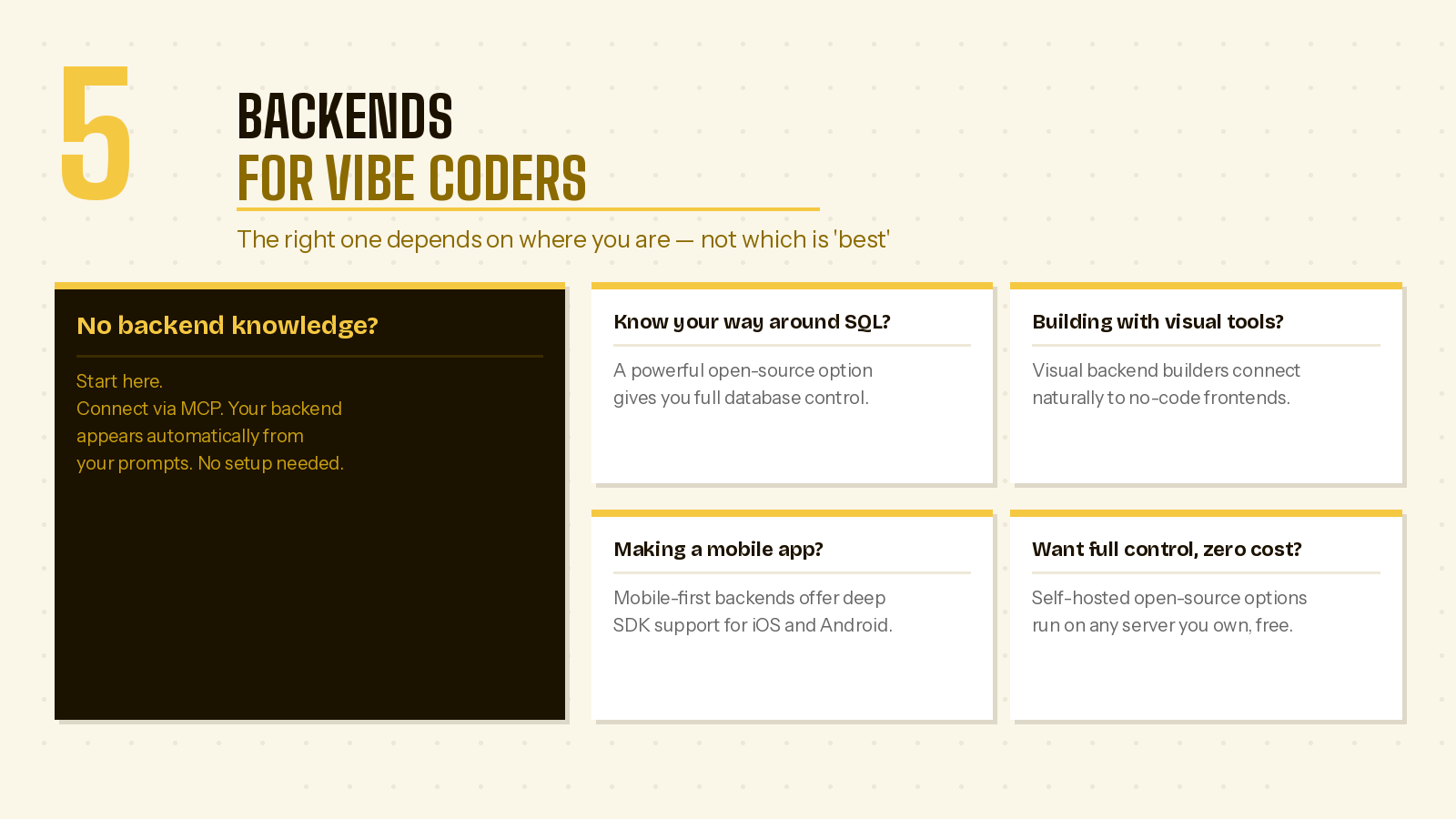
Choosing a backend is not just a technical decision - it shapes how fast you can move, what you can build, and how much you depend on others to maintain it. Here is how to think about it based on where you are right now.
If you are non-technical and building with an AI coding tool: Choose Butterbase. Most backends assume you already know how to write database queries, configure authentication, and set up API routes. Butterbase does not. It connects directly to AI coding tools like Lovable and Cursor through MCP, which means your AI assistant can create tables, set up auth, and wire up your entire backend just from your natural language prompts. There is no dashboard to learn, no SQL to write, and no configuration files to manage. You describe what you want, and it gets built. For someone who is building their first real product with AI tools, this removes the single biggest barrier between having a working prototype and having a working product.
If you are a developer comfortable with SQL: Choose Supabase. If you already know your way around PostgreSQL and enjoy writing queries, Supabase gives you the most powerful and flexible foundation. You get a full Postgres database with row-level security, a well-documented API layer, built-in auth, and real-time subscriptions - all backed by an active open-source community. The developer experience is strong, the documentation is thorough, and the ecosystem of tools and integrations continues to grow. For technical builders shipping production SaaS, Supabase is the most complete package available.
If you are a no-code founder building with Bubble or WeWeb: Choose Xano. Visual frontend tools need a visual backend, and Xano is the best one available. Its drag-and-drop API builder lets you create complex backend logic without writing a single line of code. The learning curve is steeper than you might expect from a no-code tool, but once you understand how Xano's function stacks and data model work, you can build surprisingly sophisticated applications. If your entire stack is visual, Xano fits naturally into that workflow.
If you are building a native mobile app with Swift or Kotlin: Choose Firebase. Google's mobile SDKs for native iOS and Android development are deeply integrated - push notifications, crashlytics, remote config, and offline sync all work out of the box with native code. If you are writing Swift or Kotlin and need Google-specific services like AdMob or Google Analytics, Firebase is the natural fit. That said, if you are building a mobile app with an AI coding tool or a cross-platform framework like React Native or Flutter, Butterbase or Supabase will likely serve you better - Firebase's complexity is only justified when you need its native-specific features.
If you want zero cost and full control: Choose PocketBase. Sometimes you do not want a platform - you want a tool. PocketBase gives you a complete backend in a single binary file that you can run on your own hardware, your own VPS, or even your laptop. There are no accounts to create, no vendor dashboards to navigate, and no monthly bills. You own everything. The trade-off is that you also manage everything - scaling, backups, and deployment are your responsibility. For side projects, internal tools, and builders who value sovereignty over convenience, PocketBase is hard to beat.
The bottom line
The backend used to be the wall where non-technical builders hit a dead end. In 2026, that wall is gone. The right platform can provision a production-ready backend in seconds - with authentication, database, storage, and API all configured and connected to the tool you are already building in.
But "the right platform" depends entirely on who you are and how you work. Butterbase is for builders who think in natural language and build with AI. Supabase is for developers who think in SQL and want open-source power. Xano is for visual builders who want backend logic without code. Firebase is for mobile teams who need Google-scale infrastructure. PocketBase is for builders who want to own their stack completely.
The only wrong choice is no choice at all - shipping a frontend without a backend is shipping a demo, not a product. Pick the backend that matches how you actually build, and start shipping something real.