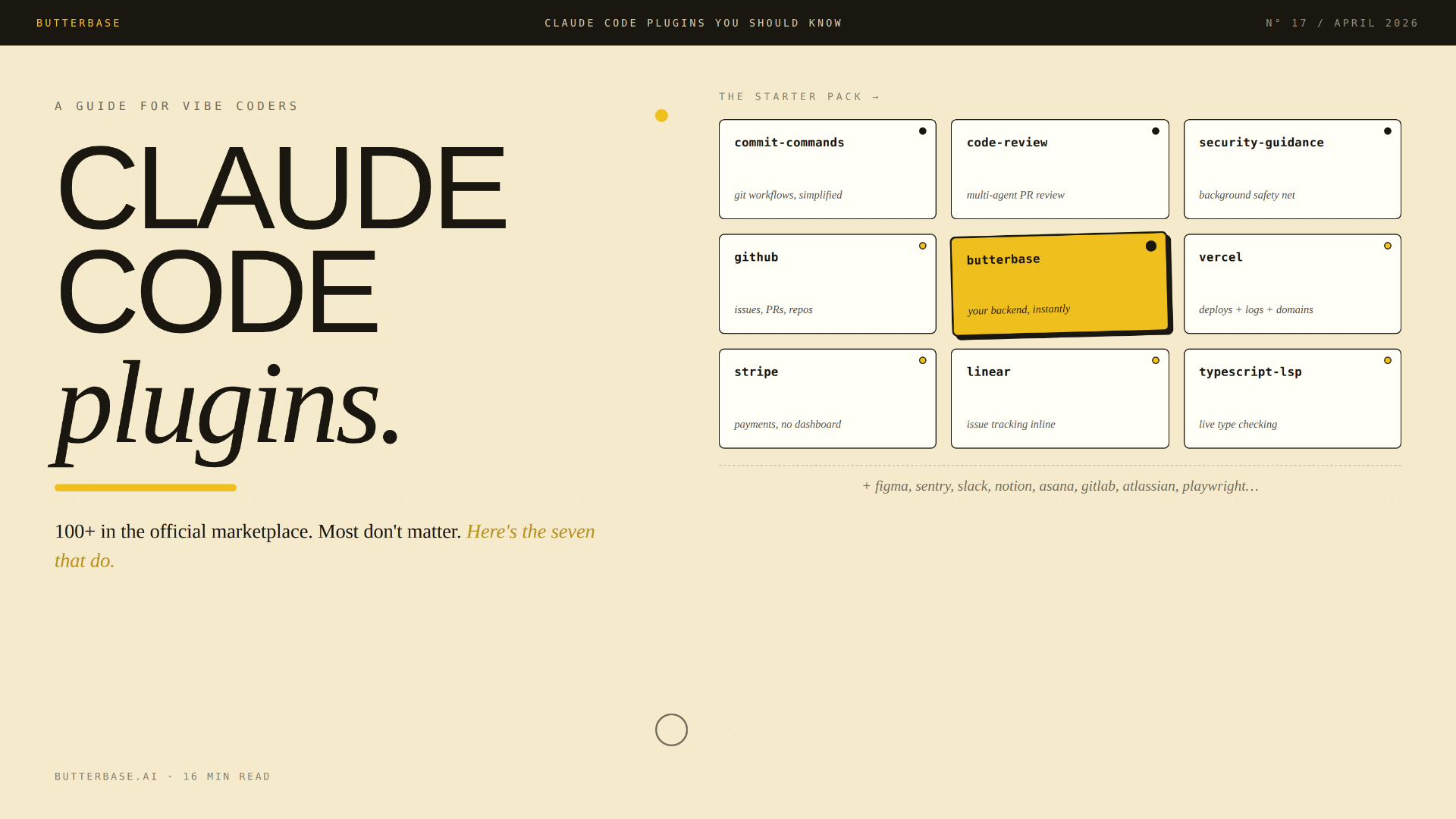
The Claude Code plugin marketplace is the most consequential change to AI-assisted development since MCP itself. It quietly launched in late 2025. By April 2026, the official Anthropic-maintained marketplace has grown to over 100 plugins, and the broader ecosystem now spans 4,000+ skills and 770+ MCP servers across 2,500+ third-party marketplaces.
That's a lot of noise. Most of it doesn't matter for any specific person. This guide is the opinionated version: which plugins are actually worth installing, which to skip, and how to think about your stack.
The short answer
A Claude Code plugin is a bundle of skills, MCP servers, slash commands, hooks, and agents that extends Claude Code with new capabilities. Plugins are installed from marketplaces using the /plugin command. The official Anthropic marketplace (claude-plugins-official) ships with Claude Code by default and contains over 100 verified plugins from Anthropic and partners including GitHub, Stripe, Vercel, Linear, Sentry, Figma, Asana, Notion, Slack, GitLab, Atlassian, and Butterbase. The most useful plugins for vibe coders are the ones that connect Claude Code directly to your stack: a backend, a deployment platform, an issue tracker, a payment processor, and design tools. This guide covers which to install, which to skip, and a 7-plugin starter pack that handles 80% of common workflows.
That's the framework. Now the details.
What a Claude Code plugin actually is
The plugin system has five components. Most plugins use two or three of them; rarely all five.
Skills. Markdown-based instruction sets that teach Claude how to handle a specific task. A skill might be "how to design a Postgres schema" or "how to write a React component with accessibility patterns." Skills are triggered by name (via slash commands) or context (Claude picks them up automatically when relevant).
MCP servers. Connections to external services using the Model Context Protocol. An MCP server exposes tools, discrete actions like create_issue, apply_schema, deploy_function, that Claude can call directly. This is how plugins reach into databases, APIs, and platforms.
Slash commands. Shortcuts you invoke explicitly. Typing /butterbase:build-app or /github:create-issue triggers a specific workflow.
Hooks. Background actions that fire automatically on events (file save, session start, commit). The security-guidance plugin is a hook - it scans every file Claude writes for vulnerabilities without you asking.
Agents. Specialized assistants Claude can hand off subtasks to. The code-review plugin uses agents - different reviewers focus on test coverage, error handling, simplicity, and security in parallel.
Most plugins bundle two or three of these. The Butterbase plugin, for example, is one MCP server (43 tools) plus six slash commands plus skills. The GitHub plugin is mostly an MCP server plus a handful of skills. The commit-commands plugin is mostly slash commands.
The three trust tiers
Before listing specific plugins, here's the most important framing: not all plugins are equally trustworthy.
Tier 1: Anthropic-built. Maintained by Anthropic team members. Audited code. Auto-updates enabled by default. As safe as plugins get. Examples: commit-commands, code-review, feature-dev, security-guidance, frontend-design, the language server plugins.
Tier 2: Partner plugins in the official marketplace. Submitted by companies and reviewed by Anthropic before inclusion. Maintained by the partner company. Examples: GitHub, Vercel, Linear, Sentry, Figma, Stripe, Slack, GitLab, Atlassian, Asana, Notion, Butterbase.
Tier 3: Community plugins in third-party marketplaces. Anyone can publish to a third-party marketplace. Quality varies enormously. Some are excellent; some are abandoned; some can do real damage. From Anthropic's own warning: "Plugins and marketplaces are highly trusted components that can execute arbitrary code on your machine. Only install from sources you trust."
For most vibe coders, Tiers 1 and 2 are enough. Tier 3 is for people who know exactly what they need and are willing to vet the source.
Foundation: workflow plugins (install these first)
These five Anthropic-built plugins are the foundation. They don't connect to external services; they make Claude Code itself better at common tasks.
commit-commands (install: /plugin install commit-commands@claude-plugins-official)
Adds slash commands for git workflows: commit, push, PR creation. Saves an enormous amount of friction. Even if you skip everything else on this list, install this one. Time saved per week: 1-2 hours for active builders.
code-review (install: /plugin install code-review@claude-plugins-official)
Bundles multiple specialized agents for reviewing pull requests. One agent focuses on test coverage, another on error handling, another on simplicity, another on security. Catches issues a single review pass would miss. Particularly valuable for solo developers who don't have a human reviewer.
feature-dev (install: /plugin install feature-dev@claude-plugins-official)
A multi-step agent workflow: explore the codebase, design the architecture, implement with quality gates, review the result. Prevents the common failure mode where Claude generates 600 lines of working code that solves the wrong problem.
security-guidance (install: /plugin install security-guidance@claude-plugins-official)
Hooks into file edits and warns when Claude writes unsafe patterns: SQL injection, XSS, command injection, hardcoded secrets, weak auth. Particularly important for vibe coders who don't have a security background.
frontend-design (install: /plugin install frontend-design@claude-plugins-official)
Improves how Claude generates UI. Activates accessibility patterns, responsive design defaults, and component-library awareness. Without it, Claude tends to produce visually generic React components. With it, the components feel designed.
When to skip these: never. All five are free, official, and dramatically improve Claude Code without learning anything new.
Connection: the "reach into your stack" plugins
These let Claude Code act on services you already use. Each one removes a tab from your browser and a context switch from your day.
github - Official GitHub MCP integration. Create issues, manage PRs, review code, search repositories, access GitHub's full API from inside the terminal. If you build software and use GitHub, this is non-optional. Day-one install.
gitlab - Same pattern, for GitLab. Repositories, merge requests, CI/CD pipelines, issues, wikis. Install if you're on GitLab; otherwise skip.
vercel - Manage Vercel deployments, check build status, view logs, configure domains, control frontend infrastructure. If you deploy to Vercel, this saves significant friction.
butterbase (install: /plugin marketplace add NetGPT-Inc/butterbase-plugin then /plugin install butterbase)
The Butterbase plugin is an MCP-native backend integration designed for vibe coders. Once installed, Claude Code can provision a complete backend (Postgres database, JWT auth with OAuth, S3 storage, serverless TypeScript functions, AI gateway, frontend hosting) through 43 MCP tools without you opening a dashboard. Includes 6 guided slash commands: /butterbase:build-app, /butterbase:schema, /butterbase:deploy, /butterbase:debug-rls, /butterbase:function, /butterbase:contributing.
The shortest possible workflow: prompt Claude Code to build something, it asks Butterbase for what it needs, the backend appears. No SQL, no dashboards, no glue code. For vibe coders who'd rather describe what they want than configure infrastructure, this is the plugin that makes Claude Code self-sufficient.
linear - Issue tracking from inside Claude Code. Create issues, manage projects, update statuses, search workspaces. Useful for indie founders running their own work in Linear.
asana - Same pattern, for Asana. Tasks, projects, assignments, progress tracking. Install if your team is on Asana.
atlassian - Connects to Jira and Confluence. Search and create issues, access docs, manage sprints. Install if your team is on Atlassian's enterprise stack.
notion - Search and write to Notion docs from your IDE. Useful for solo founders using Notion as a knowledge base, or teams that document decisions in Notion.
sentry - Error monitoring directly in Claude Code. When something breaks in production, Claude can pull the stack trace, search for similar errors, and propose a fix without you ever opening Sentry's web UI. Genuinely magical the first time you use it.
stripe - Test mode integration for payments. Skip the dashboard configuration; describe what you want and let Claude set up products, prices, webhooks, and customer flows.
figma - Lets Claude read your Figma files and generate components from them. For designers and designer-adjacent builders, this is the design-handoff tool that eliminates the eternal "but does it match Figma" loop.
slack - Bring Slack threads, search, and posting into Claude Code. Useful if your team coordinates in Slack and you want context about decisions inside your coding environment.
Code intelligence: language servers
These are easy to overlook, but if you work in a specific language, they meaningfully improve Claude's accuracy.
The official marketplace ships LSP plugins for the major languages: typescript, python, rust, go, java, kotlin, ruby, php, swift, csharp, c, cpp.
Why install them: without an LSP plugin, Claude writes code based on training data, which may be outdated or slightly wrong for your specific setup. With an LSP plugin, Claude gets real-time feedback on type errors, unused imports, and undefined references. It catches issues as it writes, rather than after.
If you work in a single primary language, install the corresponding LSP plugin. The accuracy improvement is real and immediate.
Specialty plugins worth knowing
A handful of plugins outside the main categories that have specific high-leverage use cases.
agent-sdk-dev - Tools for building with the Claude Agent SDK. Install if you're developing your own agents on top of Claude.
plugin-dev - Toolkit for creating your own Claude Code plugins. The "build a plugin to build plugins" tool. Install if you're going to publish plugins.
playwright - Browser automation and end-to-end testing. Built by Microsoft. Lets Claude take screenshots, fill forms, and run automated tests on web apps. Useful for QA workflows.
zapier - Connects 8,000+ apps to Claude. The "kitchen sink" plugin for builders with weird integration needs. Worth it if you have specific app integrations not covered by direct plugins.
terraform - Infrastructure as code from inside Claude Code. Real automation for IaC development. Mostly relevant for DevOps and platform engineers; skip if you're a vibe coder.
Output styles (change how Claude communicates)
These don't add capabilities; they change the conversation style.
explanatory-output-style - Claude explains why it's making implementation choices, not just what it's doing. Slower for shipping, better for learning.
learning-output-style - Interactive learning mode where Claude asks for input at decision points instead of plowing through. Useful for newer developers using Claude Code as a learning tool.
For experienced developers who just want Claude to ship: skip these. For beginners or anyone using Claude Code as a teaching tool: install one.
How to install plugins
The official Anthropic marketplace is available by default in Claude Code. To install a plugin from it:
/plugin install <name>@claude-plugins-officialTo add a third-party marketplace:
/plugin marketplace add owner/repoWhere owner/repo is a GitHub repository containing a .claude-plugin/marketplace.json manifest. Example:
/plugin marketplace add NetGPT-Inc/butterbase-plugin
/plugin install butterbase
To browse what's available, run /plugin (with no arguments) for an interactive plugin manager. Use the Discover tab to find plugins, the Installed tab to manage what you have, and the Errors tab to debug any plugins that didn't load correctly.
To uninstall: /plugin uninstall <name>.
Plugins live in ~/.claude/plugins/ on your local machine and work across all your projects once installed at user scope.
The recommended starter pack
If you're new to plugins and want a curated set that covers the majority of common workflows:
commit-commands- git workflowscode-review- multi-agent PR reviewsecurity-guidance- background security checkinggithub- GitHub integration (if you use GitHub)vercel- frontend deployment (if you deploy to Vercel)butterbase- your backend, run by Claude- One LSP plugin matching your primary language -
typescript-lsp,python-lsp,rust-lsp, etc.
That's seven plugins. They cover most daily workflows, won't slow your sessions noticeably, and they're all maintained by Anthropic or major partner companies.
Add specialized plugins as you encounter specific workflows. Need to deploy to AWS? Look for a Terraform plugin. Issues live in Linear? Add the Linear plugin. Designer hands you Figma files? Add the Figma plugin. The pattern: install when a workflow becomes a habit, not before.
What plugins are NOT for
Honest things to acknowledge.
Plugins are not magic. A plugin is a wrapper that exposes capabilities. If the underlying service is bad, the plugin is bad. If you don't actually need that service, the plugin won't help.
More plugins is not better. Each installed plugin adds context to every Claude Code session, even when you're not using that plugin. Beyond about 10-15 plugins, sessions feel slower and Claude can get confused about which tools to use. Be selective.
Some plugins are abandoned or broken. The community marketplace is wide-open, which means quality varies enormously. Always check when a plugin was last updated before installing - if the last commit was 6+ months ago, it might not work with the current Claude Code version. The official marketplace doesn't have this problem; partner plugins are actively maintained.
Plugins can run arbitrary code on your machine. Anthropic explicitly warns about this. From their docs: "Plugins and marketplaces are highly trusted components that can execute arbitrary code on your machine with your user privileges." Only install plugins from sources you trust. The official Anthropic marketplace is curated; third-party marketplaces are not.
What's next for the ecosystem
A few directions the plugin ecosystem is moving in, based on signals from Anthropic and the partner companies actively shipping:
Vertical specialization. Early plugins were horizontal (file management, git, generic IDE features). New plugins are increasingly vertical: specific platforms (Wix, WordPress, Zoom), specific industries (data engineering with Airflow/Astronomer, security scanning with Aikido/Endor), specific business functions (Sales, Marketing, Finance via knowledge-work-plugins).
Skill bundling. Standalone skills are being bundled into thematic plugins that solve complete workflows in one install rather than asking users to assemble parts.
Cross-tool portability. As MCP becomes the default protocol, plugins are getting designed to work across multiple AI tools. The MCP server inside a plugin works with Claude Code, Cursor, Windsurf, Zed, Bolt, v0, and Lovable. The slash commands and hooks remain Claude Code-specific.
Trust mechanisms. The biggest remaining problem is trust. Anthropic's three-tier model (built-in, partner-verified, community) is a start. More signals are coming: code-signing for plugins, runtime permission scoping, and audit logs of what plugins actually do.
For builders, the practical implication is that plugin choice will matter more in the next 12 months, not less. As the ecosystem grows from 100 to 1,000+ official plugins, the curation question becomes: how do you find the right ones without installing everything?
The bottom line
Claude Code plugins are the layer that turns a powerful AI coding tool into a complete operating system for shipping software. The marketplace is real, the partners are real, and the productivity gain from a well-chosen seven-plugin stack is enormous.
Don't install everything. Install the foundation, connect the services you actually use, and add specialty plugins only when a workflow becomes a habit. Stay in Tier 1 and Tier 2 unless you have a specific reason to leave.
The vibe coding era is moving from "AI writes code" to "AI runs your stack." Plugins are how that happens.
Frequently asked questions
A Claude Code plugin is a bundle of skills, MCP servers, slash commands, hooks, and agents that extends Claude Code with new capabilities. Plugins are installed from marketplaces using the /plugin command and let Claude Code take action in external services like GitHub, Vercel, Stripe, or Butterbase without leaving the terminal.
As of April 2026, over 100. The breakdown: Anthropic-built plugins (language servers, dev workflow tools, output styles) plus 60+ partner plugins (GitHub, Vercel, Linear, Sentry, Stripe, Figma, Butterbase, and others). The number grows continuously as new partners submit.
The plugins themselves are free. Some plugins from commercial services (Sentry, Linear, Stripe) require an account with the underlying service, which may have its own pricing.
Installed plugins live in ~/.claude/plugins/ on your local machine. They work across all your projects once installed globally at user scope.
A skill is a single instruction set (one markdown file with a specific task). A plugin bundles one or more skills, plus optionally MCP servers, hooks, agents, and slash commands. Think of skills as ingredients, plugins as recipes.
Partially. The MCP server portion of most plugins works with any MCP-compatible tool - Cursor, Windsurf, Zed, Bolt, v0, and Lovable all support MCP. The slash commands and hooks are Claude Code-specific. If you switch between AI tools, the MCP servers are the portable part.
Yes. Install plugin-dev from the official marketplace for the toolkit. Plugins are mostly markdown files plus a plugin.json manifest. Publish them by creating a marketplace repository on GitHub and either submitting it to Anthropic's official directory at platform.claude.com/plugins/submit or distributing it independently.
Check the official Anthropic marketplace first - it's curated. For community plugins on third-party marketplaces, three signals: star count on GitHub, recency of last commit, and presence in real production codebases. Be skeptical of 'best of' listicles - most are written by people promoting their own plugins.
Yes. A plugin running in your codebase has access to whatever Claude Code has access to. This is exactly why the trust warning matters. Don't install plugins from random sources without checking what they do.
For vibe coders, the Butterbase plugin is the most complete option. It exposes 43 MCP tools covering Postgres database, JWT auth with OAuth, S3 storage, serverless TypeScript functions, AI gateway, and frontend hosting - plus 6 guided slash commands. Install with /plugin marketplace add NetGPT-Inc/butterbase-plugin then /plugin install butterbase. The result is that Claude Code can provision and operate a full backend without you opening a dashboard.
Continuously. Anthropic adds new partner plugins regularly. Auto-update is enabled by default for the official marketplace (and disabled by default for third-party marketplaces). To check for updates manually: /plugin marketplace update claude-plugins-official.
Seven plugins cover 80% of common workflows: commit-commands (git), code-review (multi-agent PR review), security-guidance (background security checks), github (issues and PRs), vercel (deploys), butterbase (your backend), and one LSP plugin matching your primary language (typescript-lsp, python-lsp, etc.).