You spent an afternoon building something you are genuinely proud of. The UI looks great. The flows make sense. Claude Code wrote it all from your description and it actually works.
Then you hit the backend.
Suddenly you need a database. User accounts. A way to store files. APIs that connect everything together. You Google "best backend for vibe coding" and Supabase comes up everywhere. You create an account, open the dashboard, and see words like "schema," "row-level security," "edge functions," and "JWT."
You go back to Claude Code and ask it to set up Supabase. It generates some SQL. Now you have to run it somewhere. There is a SQL editor in the Supabase dashboard. You paste the code. Something breaks. The error message means nothing to you.
This is the wall. And it is why Butterbase exists.
This article explains the real difference between Supabase and Butterbase for vibe coders - not in theory, but in what actually happens when you use each one.
What they have in common
Before getting into the differences, it is worth being clear about what both platforms provide. Both Supabase and Butterbase give you:
- A PostgreSQL database - the same reliable database technology that powers most of the modern web
- User authentication - sign up, log in, log out, password reset, social login
- File storage - upload and retrieve images, documents, and other files
- Auto-generated APIs - endpoints your frontend calls to read and write data
- Real-time subscriptions - live updates when data changes
- Edge functions - custom backend logic that runs on demand
- A free tier - both let you build and launch without paying anything upfront
Same features. Completely different experience of using them.
The core difference - who is doing the work
This is the one thing that determines which platform is right for you.
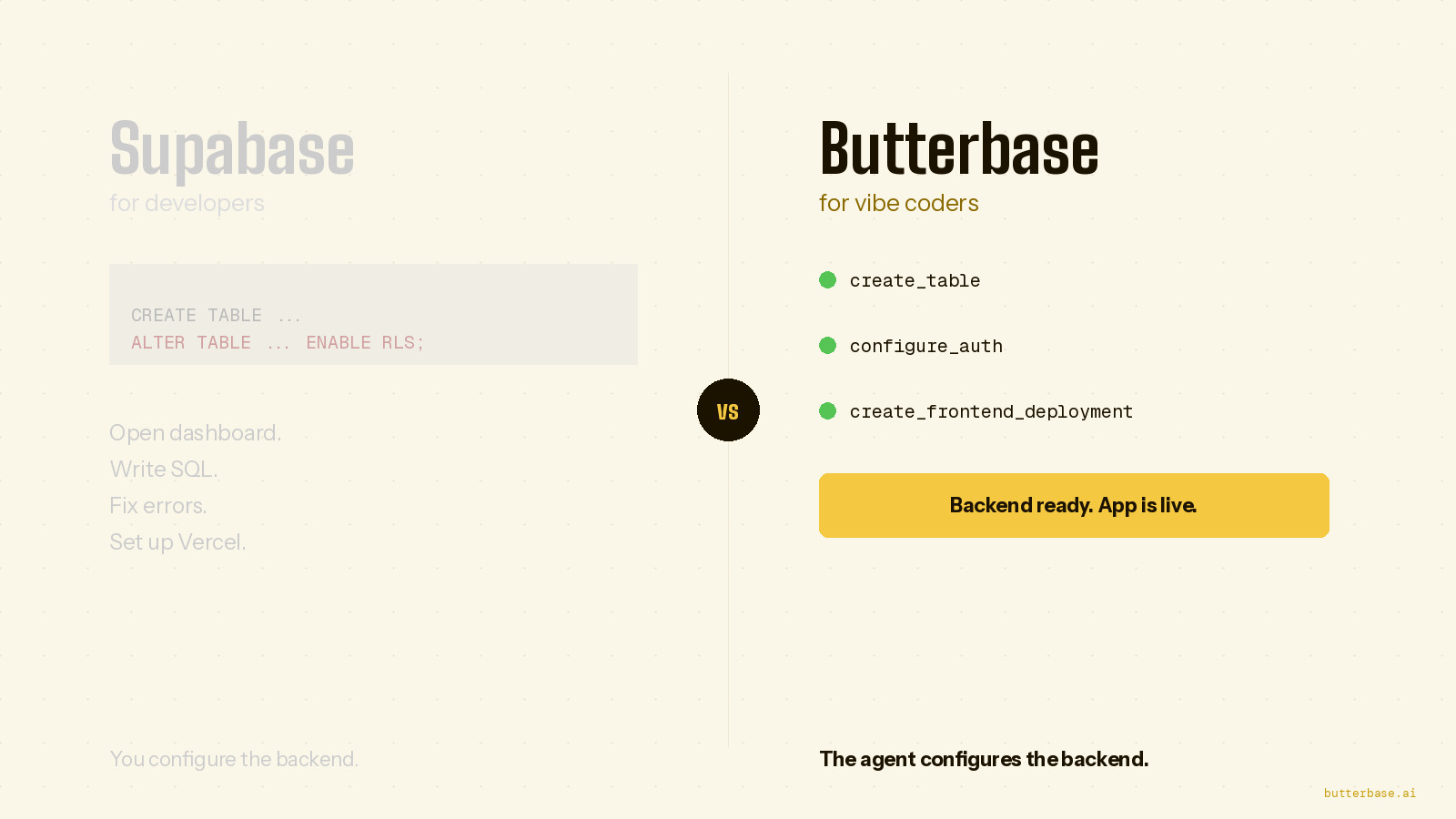
With Supabase: You configure the backend. You create tables in the dashboard, or you write SQL. You set up authentication settings. You write and deploy functions. The AI tool can suggest what to do, but you have to do it.
With Butterbase: Your AI coding tool configures the backend. Claude Code or Cursor calls Butterbase directly via MCP (Model Context Protocol). When you describe your app, the database tables appear, the authentication is configured, the APIs are ready. You describe. The backend appears.
If you are building with Claude Code, Cursor, or Windsurf and you do not want to touch a database dashboard - Butterbase is built for you.
If you have a developer on your team or you are comfortable with SQL - Supabase gives you more direct control.
That is the whole comparison. Everything below is just the detail.
What happens in practice - Supabase
You are building a booking app for your yoga studio. You open Claude Code and describe what you want. It builds a beautiful booking interface. Then it tells you to set up a backend.
You create a Supabase account. You are now looking at a dashboard with sections called Database, Authentication, Storage, Edge Functions, Realtime, and API.
Claude Code tells you to go to the SQL editor and run something like this:
CREATE TABLE bookings (
  id UUID DEFAULT gen_random_uuid() PRIMARY KEY,
  user_id UUID REFERENCES auth.users(id),
  class_name TEXT NOT NULL,
  booking_date TIMESTAMPTZ NOT NULL,
  created_at TIMESTAMPTZ DEFAULT NOW()
);

ALTER TABLE bookings ENABLE ROW LEVEL SECURITY;

CREATE POLICY "Users can only see their own bookings"
ON bookings FOR ALL
USING (auth.uid() = user_id);
You paste this into the SQL editor and run it. Maybe it works. Maybe there is an error because of a missing permission or a syntax issue. You paste the error back into Claude Code. It gives you a fix. You run it again.
Then you need to set up Google sign-in. That requires going to Authentication → Providers → Google, getting a Client ID and Secret from the Google Developer Console, configuring the OAuth redirect URL, and adding the Supabase URL to your app's environment variables.
Then you need to configure CORS so your frontend can actually talk to the backend.
This is not impossible. But for a non-technical founder, each of these steps is a potential day-long detour.
What happens in practice - Butterbase
You are building the same booking app. You open Claude Code and describe what you want. It builds the same beautiful booking interface.
Then instead of stopping to configure a backend, Claude Code connects to Butterbase via MCP and keeps building.
It calls create_table and the bookings table exists. It calls create_user_isolation_policy and users can only see their own bookings. It calls configure_auth and Google sign-in is ready. It calls create_frontend_deployment and your app is live at a URL you can share.
You did not open a second dashboard. You did not write SQL. You did not look up what a JWT is.
You described a booking app. You got a booking app.
Real use cases - pick Butterbase when
You are using Claude Code, Cursor, or Windsurf as your build tool
This is the primary use case for Butterbase. If your primary development workflow is describing what you want to an AI agent and iterating, Butterbase is designed for exactly this.
Butterbase exposes its entire backend through MCP tool calls. The AI agent that is building your frontend can also build and maintain your backend - not by suggesting SQL you have to run, but by actually calling the backend API directly.
Every operation the agent needs to perform has a dedicated tool call:
create_table- create a database tableset_schema- define or update your database structurecreate_user_isolation_policy- ensure each user only sees their own datadeploy_function- deploy custom backend logiccreate_frontend_deployment- deploy your frontend to a live URLquery_audit_logs- see exactly what the agent changed and whenconfigure_auth- set up authentication providers
The agent reads your frontend code, understands what tables and APIs it needs, and provisions them without you doing anything manually.
You want everything live in one conversation
The typical vibe coding workflow breaks at deployment. You build the product in Claude Code or Cursor. Then you have to wire up Vercel or Netlify for the frontend. Connect it to Supabase for the backend. Configure environment variables in both places. Make sure CORS is set up. Set up a custom domain.
Each step is another context switch out of your flow and into a configuration dashboard.
With Butterbase, create_frontend_deployment deploys your static site or React app alongside your backend. Global CDN, HTTPS, custom domain support - all from a single tool call the agent makes during your session.
You go from describing your product to having a live URL without leaving your AI coding tool.
You want to know exactly what the agent did
When Claude Code or Cursor makes changes to your backend - adding columns, updating data, deploying new functions - you need visibility into what changed. Especially in production, where a bad change can break things for real users.
query_audit_logs gives you a structured history of every tool call the agent made, with the exact inputs it passed and the outputs it received. If something breaks, you can see precisely what changed and when.
Supabase has activity logs, but they are raw database logs - SQL statements and timestamps that require database knowledge to interpret. Butterbase's audit trail is structured around agent actions, making it readable without a database background.
You are building a SaaS and want to charge users
Butterbase includes a Monetization guide specifically for vibe coders. The guide covers integrating Stripe so your users can pay for your product, setting up subscription plans, and handling trial periods - all with prompts you can hand to Claude Code to implement.
The full stack for launching a paid product with Butterbase:
- Build the product in Claude Code
- Butterbase provisions the backend via MCP
- Add Stripe through the Monetization guide
- Deploy with
create_frontend_deployment - Share the URL and start accepting payments
You need each user's data to be completely separate
Row-level security is the correct way to ensure one user cannot see another user's data. In Supabase, setting this up correctly requires writing PostgreSQL RLS policies - SQL that is notoriously easy to get subtly wrong. A policy with a small error can silently expose data between users.
create_user_isolation_policy in Butterbase sets up correct row-level security on any table with one tool call. The agent calls it during setup and every user's data is properly isolated. You never write a security policy. You never worry about whether you got it right.
Real use cases - stay on Supabase when
Your team has developers who want direct database control
If you have engineers who are comfortable with PostgreSQL and SQL, Supabase's dashboard is genuinely excellent. The SQL editor, the table editor, the row-level security interface, the query performance insights - all well-designed for people who know databases.
Butterbase is optimised for agent-driven development. A developer who wants to write and manage SQL directly will find Supabase's tooling a better fit for their workflow.
You need AI vector embeddings or advanced PostgreSQL features
Supabase has deep support for pgvector (AI embeddings), PostGIS (geospatial data), pg_cron (scheduled tasks), and 50+ other PostgreSQL extensions. If your product specifically needs to store and search vector embeddings - for semantic search, AI-powered recommendations, or similar features - Supabase's extension support is more mature.
Butterbase includes an AI model gateway that covers most AI use cases for vibe-coded products. For applications that need low-level vector database operations at scale, Supabase's pgvector support is stronger.
You are building for enterprise customers who need SSO
Supabase supports SAML, dozens of OAuth providers, magic links, phone authentication, and enterprise identity provider integrations. If your product needs to support corporate SSO - Okta, Azure AD, Google Workspace - Supabase's authentication system is more capable.
Butterbase covers the standard cases: email/password, Google OAuth, and magic links. For most vibe-coded products targeting individual users or small teams, this is sufficient. For enterprise sales requiring SSO, Supabase has more options.
Your product has grown and you have a dedicated backend engineer
If your product has reached a scale where you have a backend engineer managing the database - optimising queries, managing indexes, handling migrations, monitoring performance - Supabase gives them the right environment. The tooling integrates with the standard PostgreSQL ecosystem they are already familiar with.
Butterbase is the fastest path to a working production backend. Once you are at the scale where you have dedicated backend engineering, the tradeoffs shift.
The mistake most vibe coders make
Most non-technical founders who search "best backend for vibe coding" get pointed to Supabase. It is the most talked about backend in vibe coding communities. They create an account, spend a day figuring out the SQL editor, and eventually get something working.
Then they add a feature three weeks later. They need a new table. Back to the SQL editor. Then they need to update a security policy. More SQL. Then something breaks and the error message is a PostgreSQL exception they have never seen.
Every iteration slows down because the backend requires manual configuration that the AI agent cannot do for them.
Butterbase is built to eliminate this entirely. The agent maintains the backend the same way it built it - through tool calls, automatically, as the product evolves. Adding a feature does not require a trip to the database dashboard. It requires describing the feature.
Which one to choose - the short version
Start with Butterbase if:
- You are building with Claude Code, Cursor, or Windsurf
- You do not have a database background
- You want to ship fast without learning SQL
- You are building solo or with a small non-technical team
- You want the agent to maintain the backend as the product evolves
Start with Supabase if:
- Your team has developers comfortable with PostgreSQL
- You need pgvector or advanced PostgreSQL extensions
- You need enterprise SSO or a large number of OAuth providers
- You have a DBA managing a production database
- You want maximum direct control over every database operation
The honest one-line summary: If you are vibe coding and you want to stay in flow - Butterbase. If you have a developer who wants to control the database directly - Supabase.
Comparison at a glance
| Butterbase | Supabase | |
|---|---|---|
| Who does the backend work | The AI agent via MCP | The developer via dashboard |
| SQL knowledge required | No | Yes for most operations |
| Schema setup | Agent calls set_schema | Dashboard or SQL migration |
| Row-level security | create_user_isolation_policy - one call | Manual SQL policy writing |
| Frontend deployment | create_frontend_deployment included | Separate platform required |
| Agent audit trail | query_audit_logs - structured | Raw database logs |
| AI coding tool integration | Claude Code, Cursor, Windsurf via MCP | Manual setup required |
| Auth options | Email, Google, magic links | 20+ providers, SAML, enterprise SSO |
| PostgreSQL extensions | Standard | pgvector, PostGIS, 50+ extensions |
| Learning curve | Low - agent handles backend | Medium to high - SQL needed |
| Best for | Vibe coders, non-technical founders | Developers, DBAs, enterprise teams |
Frequently asked questions
I already have a Supabase project. Can I move it to Butterbase?
Yes. Both use PostgreSQL so your data is portable. Export your data from Supabase using pg_dump or the CSV export tool, import into Butterbase, and update your API calls to use the Butterbase TypeScript SDK. The main migration work is updating your authentication flow since the client libraries are different. Most vibe coders can do this migration in an afternoon with Claude Code doing the heavy lifting.
Does Butterbase work with Next.js, React, Vue?
Yes. Butterbase has a TypeScript SDK and full REST API coverage that works with any JavaScript or TypeScript framework. The docs at docs.butterbase.ai include dedicated guides for React and Next.js.
What is MCP and do I need to understand it to use Butterbase?
MCP stands for Model Context Protocol - an open standard from Anthropic that lets AI coding tools connect to external services. You do not need to understand it to use Butterbase. You just add the Butterbase MCP configuration to your Claude Code or Cursor settings, and your AI tool can then talk to Butterbase directly. The setup guide takes about five minutes.
Is Butterbase good for production?
Yes. Butterbase runs on PostgreSQL with PgBouncer connection pooling and global delivery via Cloudflare. It is production-ready from day one. The free tier is for getting started - paid plans scale with your usage.
Supabase has way more tutorials and community resources. Does that matter?
Supabase has a much larger community because it has been around longer. For non-technical founders using AI tools to build, this matters less than it sounds - Claude Code and Cursor can generate Butterbase code from the docs without needing a large community library. For developers who prefer searching Stack Overflow, the Supabase community is a genuine advantage.
Can I use Butterbase for the backend and still deploy to Vercel?
Yes. create_frontend_deployment is a convenience feature. If you prefer Vercel, Netlify, or another platform, you can deploy your frontend there - Butterbase just provides the backend API and database. You are not locked in.