There's a specific moment that kills more vibe-coded projects than anything else. It's not when the AI gets confused. It's not when the code breaks. It's the moment, around hour three of a Saturday afternoon, when you realise you've been told about ten different tools, you don't know which ones you actually need, and you can't tell whether the next tool you install will save you four hours or waste them.
This guide is the cure for that moment. It's a complete, opinionated, end-to-end toolkit for taking an idea and turning it into a working live app - every tool you need, when to introduce it, and what to skip. It's organised by the order you'll actually need things, not by category. Because the real question isn't "what are the best AI coding tools?" It's "what do I install today, and what can wait until next week?"
The short answer
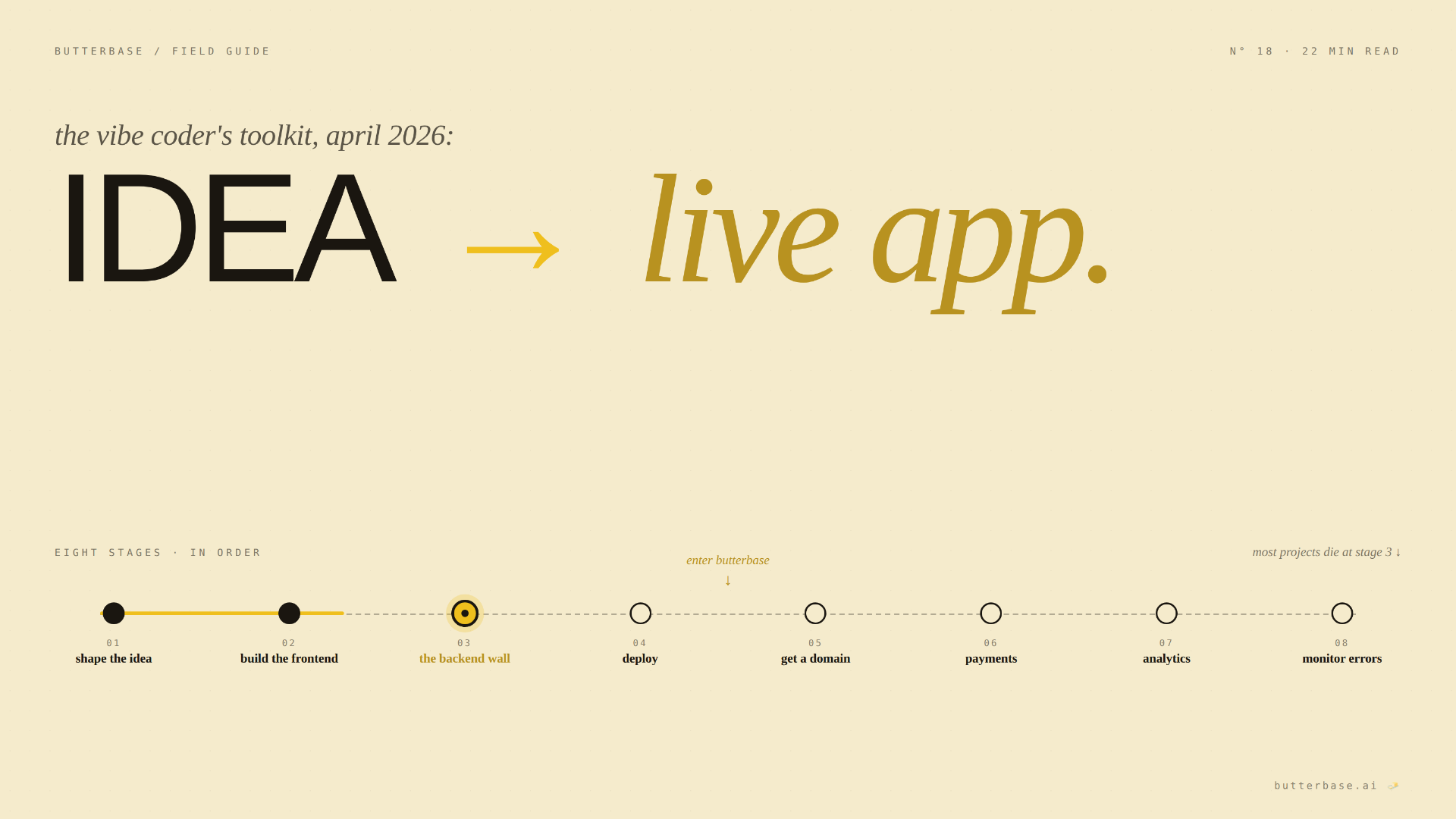
A complete vibe coding stack in 2026 needs eight things, in this order: (1) an idea-shaping tool like Claude or ChatGPT, (2) an AI coding tool like Claude Code, Cursor, Bolt, v0, or Lovable, (3) an MCP-native backend like Butterbase, (4) a deployment platform (often built into your AI coding tool), (5) a domain registrar like Cloudflare or Namecheap, (6) a payments processor like Stripe (only when you charge money), (7) basic analytics like Plausible or PostHog, and (8) error monitoring like Sentry. You can ship a real, live, paying-customer app with eight tools. Most projects need fewer.
That's the structure. Now the details.
The eight stages of building a vibe-coded app
A vibe-coded project follows a predictable shape. Here are the eight stages, what each one needs, and the tools worth knowing.
Stage 1 - Shape the idea (before you write any code)
This is the stage most builders skip and later regret. Before you write a single prompt to an AI coding tool, you should know what you're building. You don't need a 40-page spec. You need answers to four questions: who is this for, what specific thing does it do for them, what's the smallest version that's useful, and what does "done" look like.
Tools worth using
- Claude or ChatGPT in conversation mode - the best idea-shaping tools. Walk through your concept out loud. Have the AI poke holes. Iterate.
- A notes app of your choice - Notion, Apple Notes, Obsidian, Google Docs. The point is having one place where the spec lives.
- Excalidraw for sketching - when you need to wireframe a UI or map out how data flows. Free, browser-based, no account needed.
Time investment: 30 minutes to 2 hours. Skip this and you'll spend 10+ hours building the wrong thing.
What to skip: Don't worry about brand identity, domain names, logos, or colour palettes. None of those matter until something exists.
Stage 2 - Build the frontend
This is where AI coding tools earn their reputation. In 2026, you can describe a UI and have it appear in minutes. The right tool depends on what you're building and how much code you want to be able to read later.
For browser-based, zero-setup builds
- Bolt.new - runs entirely in your browser, no install. Best for prototypes and demos when you want to ship something today.
- Lovable - chat-based full-stack builder. Strong for non-technical founders who want a working app from a single conversation.
- v0 by Vercel - best for polished React/Next.js components. Generates production-quality frontends with shadcn/ui defaults.
For deeper, code-aware builds
- Claude Code - terminal-native AI coding tool from Anthropic. Best for builders who want full control of the codebase. Has the deepest plugin ecosystem.
- Cursor - desktop IDE with AI baked in. The closest experience to "VS Code with superpowers."
- Windsurf - agentic IDE with strong codebase awareness. Good for larger projects.
- Zed - minimalist editor with native AI integration. Smaller user base, but elegant.
Tactical recommendation: If you've never built a software product before, start with Bolt or Lovable. They get you to "look, I built a thing" within an hour, which is the moment most vibe coders get hooked. If you're more technical or committed to shipping a real product, start with Claude Code or Cursor - the learning curve is slightly higher, but the ceiling is higher too.
What to skip: Don't try to choose between five tools by reading reviews. Pick one and use it for an afternoon. You'll know within two hours whether a tool clicks.
Stage 3 - Add the backend (the wall everyone hits)
This is the wall where most vibe-coded projects die. You've built a beautiful frontend. It looks great. Then you realise: where do users sign up? Where does their data live? How does anything persist between sessions? Welcome to the backend question.
For most of the past decade, the answer was "go learn SQL, configure a dashboard, manage migrations." For vibe coders in 2026, that answer is wrong.
The right answer is an MCP-native backend. That means a backend your AI coding tool can operate directly through the Model Context Protocol - creating tables, configuring auth, deploying functions, all without you opening a dashboard.
The recommendation: Butterbase
Butterbase was built specifically for vibe coders. MCP-native, with 43 tools your AI agent can call. Postgres database, JWT auth with OAuth, S3-compatible storage, serverless TypeScript functions, an OpenAI-compatible AI gateway, frontend hosting. The whole backend appears from the same conversation where you built the frontend. No SQL, no dashboards, no glue code. Free tier available; paid plans from $19/month.
How to install (Claude Code): from your terminal, run /plugin marketplace add NetGPT-Inc/butterbase-plugin followed by /plugin install butterbase. For Cursor, Windsurf, Zed, or another MCP-compatible tool, add the Butterbase MCP server to your config (instructions at butterbase.ai/docs).
Time to first working backend: 5–10 minutes. The AI tool does the work; you stay in the chat.
What to skip: Don't try to set up your own Postgres instance, your own auth system, your own file storage, your own functions runtime. Each of those is a multi-hour rabbit hole that solves a problem already solved better by the platform.
Stage 4 - Deploy your frontend
You need a public URL. People can't use what they can't visit.
The good news: if you're using Bolt, Lovable, or v0, deployment is built in. Each project gets a free URL automatically. If you're using Claude Code, Cursor, Windsurf, or Zed, you need a deployment platform.
- Vercel - built by the same team as Next.js. Best-in-class for React, Next.js, and most modern frontends. Free tier is generous; paid plans start at $20/month.
- Netlify - comparable in quality and pricing. Excellent for static sites and JAMstack builds.
- Cloudflare Pages - fastest CDN globally, free tier with no bandwidth limits. Worth it if you're optimising for speed and cost.
Butterbase also includes frontend hosting - meaning you can host your frontend at a *.butterbase.dev URL alongside your backend, with HTTPS and zero config. Useful for prototypes and small production apps.
Tactical recommendation: if you're building a serious product, use Vercel for the frontend. If you're shipping fast and don't want to set up a separate deploy, use Butterbase's built-in hosting until you outgrow it. Most vibe-coded projects never do.
What to skip: Don't deploy to AWS, GCP, or Azure directly. The hyperscalers are the wrong answer for vibe coders.
Stage 5 - Get a domain
Your app should live at a real URL. myapp.com instead of myapp-x7-final.vercel.app.
- Cloudflare Registrar - at-cost pricing (no markup), best DNS, free SSL. The right answer for almost everyone in 2026.
- Namecheap - slightly more expensive but extremely user-friendly. Good if you want a clean dashboard and don't want to learn Cloudflare's interface.
- Google Domains - got transferred to Squarespace. Still works, slightly messier than it used to be.
Tactical recommendation: Cloudflare. You'll save $10–30/year per domain, the DNS performance is genuinely best-in-class, and once you have a Cloudflare account you can also use their free CDN, free SSL, and free DDoS protection.
What to skip: Don't pay for premium domain names. Don't pay for ".io" if ".com" is available - Google treats them the same now, but ".com" is still what users expect to type.
Stage 6 - Add payments (only when ready)
The vast majority of vibe coders add payments too early. Don't. If your app doesn't have users yet, payments don't matter. If it has users but they aren't asking to pay, payments don't matter. Add payments after someone says "I would pay for this" - not before.
When you're ready, the answer is Stripe. It handles subscriptions, one-time payments, marketplaces, invoicing, refunds, fraud detection. For vibe coders specifically, the Stripe MCP plugin lets your AI tool configure products, prices, and webhooks without you touching the dashboard.
Alternatives: Lemon Squeezy and Paddle handle EU VAT and merchant-of-record stuff for you (which Stripe doesn't), at the cost of higher fees. Worth considering if you sell digital goods to a global audience.
What to skip: Don't build your own payment forms. Don't accept credit cards directly. Use Stripe Checkout or Stripe Customer Portal - they're already designed by people smarter than us about conversion rates.
Stage 7 - Add analytics
You need to know if people are using your app.
Privacy-friendly, simple, free or cheap
- Plausible - open-source, privacy-first analytics. Clean dashboard. $9/month for small projects. No cookie consent banners needed.
- Fathom - similar to Plausible. Slightly different aesthetic, comparable feature set. $15/month.
- Simple Analytics - same category, similar pricing.
Product analytics for tracking specific user behaviours
- PostHog - open-source product analytics with funnels, session replays, feature flags, and A/B testing. Generous free tier. The right tool when you start asking "why did 30% of users drop off at step 3?"
Tactical recommendation: install Plausible when you launch. It's a one-line script and the dashboard is so simple it requires no learning. When you have 100+ daily users and start asking real product questions, add PostHog.
What to skip: Don't install five analytics tools "just in case." Don't sign up for Mixpanel or Amplitude as your first analytics tool - they're great products built for teams with dedicated analysts.
Stage 8 - Monitor errors
When something breaks in production - and something will - you need to know about it before your users do.
Sentry is the default error monitoring tool. Captures crashes, performance issues, and slow API calls. Free tier is generous. The Sentry MCP plugin lets Claude Code pull stack traces directly when something breaks, then propose fixes.
Alternatives: Highlight (open-source competitor), Bugsnag (similar but slightly different), LogRocket (combines errors with session replays).
What to skip: Don't try to build your own error logging. Don't rely on console.log in production. Don't check your server logs manually.
A complete starter stack
Here's the minimum stack to ship a working app in 2026, and what it costs at small scale:
- Idea shaping - Claude Pro · $20/mo
- AI coding - Claude Code or Cursor · $20/mo
- Backend - Butterbase · $0–19/mo
- Frontend hosting - Vercel · $0
- Domain - Cloudflare Registrar · ~$10/yr
- Payments - Stripe · 2.9% + $0.30 per transaction
- Analytics - Plausible · $9/mo
- Error monitoring - Sentry · $0
Total fixed costs at startup: roughly $50–70/month depending on which paid tiers you choose, plus per-transaction Stripe fees once you have customers.
For comparison: hiring an engineer to build the same stack manually costs $5,000–50,000 depending on how much you outsource. The cost-of-tools-to-cost-of-engineer ratio in 2026 is roughly 1:100 to 1:1000.
A more advanced stack
Once you have users and the basics are working, here's what to add:
- Email sending - Resend or Postmark, when you send the first signup-confirmation email.
- Transactional notifications - Knock, when you have multi-channel notifications.
- Calendar / scheduling - Cal.com (open source), if your app involves scheduling.
- File processing - built into Butterbase, when you accept user uploads.
- Background jobs - built into Butterbase functions, when you need scheduled tasks.
- AI features - Butterbase AI Gateway, when your app uses LLMs.
- Search - Typesense or Algolia, when you have 1000+ items to search.
- Customer support - Plain or Crisp, when you have paying customers.
- Documentation - Mintlify or your own markdown, when users start asking how things work.
You don't need any of these on day one. Add them when the absence becomes a real problem.
Tools we explicitly don't recommend
A few categories of tools where the obvious answer is the wrong one for vibe coders.
- Direct cloud providers (AWS, GCP, Azure). Too much surface area. Use platforms built on top of them instead (Vercel, Cloudflare, Butterbase). The hyperscalers are designed for engineers; you don't need that complexity.
- Self-hosted backends as your default. Self-hosting a database, an auth service, and file storage is a whole engineering job. If you're a vibe coder, you're outsourcing that job to platforms.
- Bubble, Glide, Adalo, Softr, Webflow. Traditional no-code tools. Great for landing pages and simple forms. Not great for AI-coded software - the vibe coding workflow assumes your AI tool has direct programmatic access to your stack.
- Generic project management tools as "single source of truth." Notion, Linear, Asana - fine for tracking work, but your AI coding tool should be your project memory; PM tools should be ancillary.
How to tell if your stack is working
A vibe-coded project on the right stack has these signs:
- You can describe a feature and have it live within an hour. If features take days, your stack is fighting you.
- You rarely open a dashboard. Every dashboard tab is a context switch and a friction point. The right tools collapse those into your AI conversation.
- You don't know your own backend's URL by heart - because you never visit it directly.
- When something breaks, the AI helps fix it. Not "go check this dashboard." Actually fixes it.
- Your costs are predictable and small. No surprise bills, no credit overages, no infrastructure you forgot about.
If your project doesn't have these properties, the bottleneck is almost always the stack, not your skill.
The fastest path from zero today
- Spend an hour shaping the idea with Claude.
- Pick one AI coding tool and use it for an afternoon (Bolt or Claude Code).
- Connect Butterbase as your backend.
- Deploy to Vercel or use the built-in hosting.
- Buy a domain on Cloudflare.
- Ship the link to one person.
- Wait for them to actually use it.
- Then come back and add payments, analytics, monitoring.
You can be at step 7 by the end of the day. Most projects that fail get stuck somewhere between steps 1 and 3, trying to choose the perfect set of tools instead of using a good-enough set right now.
The bottom line
The vibe coding toolkit in 2026 is smaller than people think. Eight tools to ship a real, paying-customer product. Most have free tiers. None require a CS degree.
The mistakes most vibe coders make aren't about choosing the wrong tool. They're about installing too many tools, trying to make the perfect choice instead of a good-enough one, and adding tools speculatively instead of when a real need shows up.
Pick the tools. Ship the thing. Iterate later.
FAQ
No. The minimum to launch is steps 1–5 (idea, frontend, backend, deploy, domain). Steps 6–8 (payments, analytics, monitoring) come once you have users.
For prototyping: one all-in-one tool (Bolt or Lovable). For real products: specialised tools that work together. The all-in-one tools have hidden ceilings that you'll hit, and migrating off them is harder than starting with separate components.
Plan for it. Tools that lock you in (proprietary databases, closed-source code generators) are riskier than tools that don't (Postgres backends, code you own in a Git repo). Anything in this guide can be migrated away from with reasonable effort.
Roughly $0–30/month to ship something that works. Roughly $50–100/month for a stack you'd recommend to a friend. Roughly $200/month if you have meaningful traffic and want every monitoring/analytics/email tool.
Yes, but you'll be slow. The AI coding tool is the multiplier. Without it, you're back to traditional development - which is fine if that's what you want, just don't pretend it's vibe coding.
start with Claude Code or Cursor. Add Butterbase when you need a real backend. Add Stripe when someone offers to pay you. Don't add anything else until you have users.
Claude Code for the frontend, Butterbase for the backend (one MCP install). Two tools, app live by lunch.
Add a tool when its absence is causing measurable pain. Don't add tools speculatively. Every tool is a maintenance commitment, a learning curve, and a potential failure point. The right number of tools is the smallest number that makes your specific project work.